
POS systems · Aloha
NCR's Aloha POS for table-service and quick-service restaurants: split checks and bar tabs up front, kitchen routing in the back, and takeout and delivery in the same system.
Find the right POS for your restaurant →New Business? Start Here
Or call 949-946-2442 or text us.
Order entry, the kitchen, and takeout in one system.
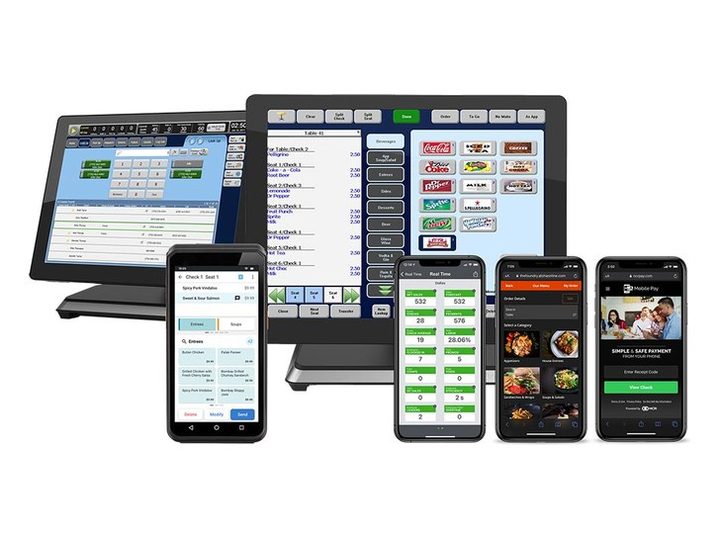
NCR's restaurant POS for table-service and quick-service restaurants.
Key benefits
Quick, accurate order entry for table service and quick service.
Split checks by seat and keep multiple bar tabs open.
Tip sharing for table-service staff.
Orders routed by cook time, with recipes, images, or videos for each item.
Order status updates so customers know when pickup is ready.
Multi-stop delivery routes, delivery areas per restaurant, automated kitchen scheduling, and loyalty rewards however customers order.
Find the right POS for your restaurant →New Business? Start Here
Split checks, seats, and tip sharing.
Fast order entry and pickup status updates.
Multiple bar tabs open at once.
Delivery routes and areas, with loyalty on every order.
Seats, split checks, and tip sharing on a busy floor.
Setup: Aloha with split checks by seat, tip sharing, and orders routed to the kitchen by cook time.
Several tabs open at once on game night.
Setup: Aloha with multiple bar tabs open, and split checks when the group settles up.
Online and phone orders with drivers on the road.
Setup: Aloha with multi-stop delivery routes, delivery areas, and pickup status updates for customers.
These are examples. Your setup is based on how your business runs and what you process.
Your menu, how you serve, and what you use today. Send your last 2 statements if you have them.
What you pay now next to interchange-plus and dual pricing, in dollars per month.
Configured around your floor, your bar, and your kitchen, with processing priced on its own.
Training for your team, then next-day funding on your sales.
You get next-day funding. Your money shouldn't sit with a processor for days.
Terminals and POS at $0 upfront on approved setups. No lease. We match the equipment to how you sell.
No long-term contract and no cancellation fee on the processing agreement we set up.
Setup and training are part of the account.
Your markup never goes up. Interchange is set by the card networks and can change.
Processor and POS support is available 24/7, except most federal holidays. Day-to-day account questions come straight to us.
Yes. Aloha handles both table service and quick service, with takeout, loyalty, and delivery routes in the same system.
Qualifying merchants get terminals or POS at $0 upfront. We tell you what you qualify for before anything is ordered.
The processing agreement we set up is month-to-month, with no cancellation fee.
You get next-day funding.
Yes. Aloha supports multi-stop delivery routes, delivery areas for each restaurant, and loyalty rewards however customers order.
Yes. Split checks by seat and keep multiple bar tabs open at the same time.
Still have a question? Call 949-946-2442 or text us.
Find the right POS for your restaurant →New Business? Start Here
Other POS systems: Clover · Cojilio · FigurePOS · FoodTec · HotSauce · KORONA · Material · Micros · MicroSale · OctoPOS · Quantic · SwipeSimple · Union · Integrations · All POS systems
Attach your last 2 months of statements if you have them. If not, send your details and we'll follow up.
No statements needed. Tell us about the business and we'll recommend the POS and payment setup that fits, then follow up to go over it.