
Solutions · QuickBooks integrations
Stop typing the same sale twice. Payments, invoices, and customers sync with QuickBooks, and you keep the books you already have.
Get My Free Rate Analysis →New Business? Start Here
Or call 949-946-2442 or text us.
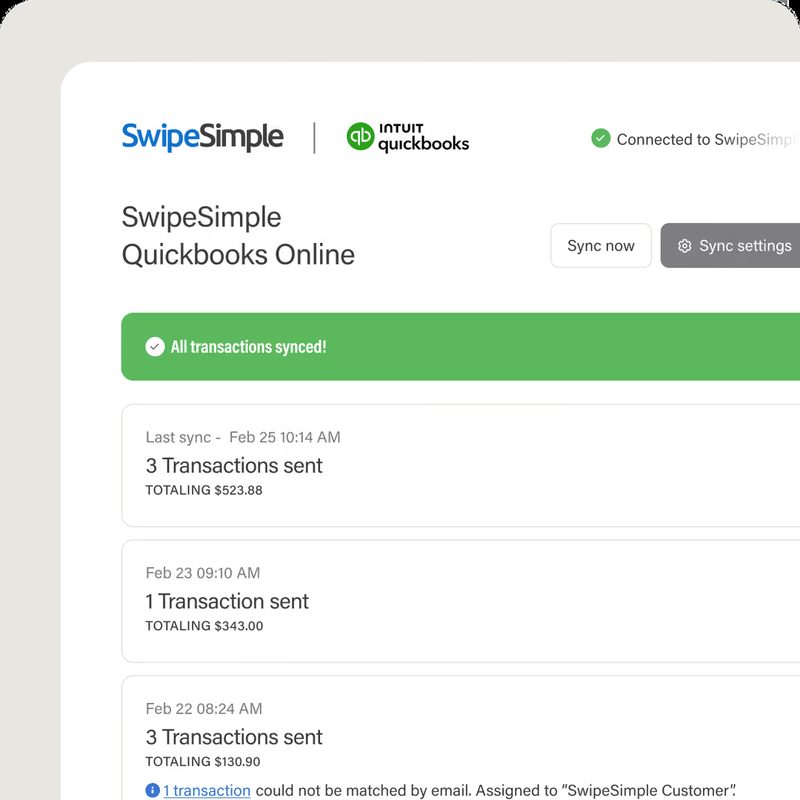
SwipeSimple sends your transactions to QuickBooks Online automatically, or right away with Sync now.
Two-way sync with QuickBooks Online for invoices, payments, and customers.
Automated invoicing that connects to your accounting software, with automatic batch reconciliation.
Invoicing, payments, and reconciliation that sync with QuickBooks and NetSuite.
A gateway with Shopify, QuickBooks, and Xero integrations.
A retail POS that connects to QuickBooks. See Material POS →
Oracle NetSuite connects through the PayBright Gateway, and Chargezoom syncs with NetSuite as well.
Invoices from QuickBooks go out with a pay link through BillerGenie or Hyfin, and payments post back.
BillerGenie connects to QuickBooks Desktop as well as Online.
Clients pay large invoices by bank transfer.
Retainers and monthly services billed automatically.
Keep QuickBooks and move card processing to your own merchant account.
We set up and test the new tool before you switch.
Invoices and payments that post to your books on their own.
Material POS sales that connect to QuickBooks.
Payments matched to open invoices.
SwipeSimple sales sent to QuickBooks Online.
Payments post to the right invoice on their own.
Deposits match what QuickBooks shows.
Clients pay from a link instead of mailing a check.
Interchange-plus pricing on your own merchant account, so you can see what the card networks charge and what we charge.
QuickBooks Online, QuickBooks Desktop, or NetSuite, and how you take payments.
Hyfin, SwipeSimple, BillerGenie, Chargezoom, or NMI.
Link the tool to your QuickBooks account.
Transactions post to your books without retyping.
Pairs well with: Invoicing · Recurring billing · SwipeSimple · Material POS
You get next-day funding, so you aren't waiting days for your own money.
Terminals and POS at $0 upfront on approved setups. No lease. We match the equipment to how you sell.
No long-term contract and no cancellation fee on the processing agreement we set up.
Setup and training are part of the account.
Your markup never goes up. Interchange is set by the card networks and can change.
Processor and POS support is available 24/7, except most federal holidays. Day-to-day account questions come straight to us.
Hyfin syncs both ways with QuickBooks Online, so invoices, payments, and customers stay matched in both systems.
No. If you use QuickBooks Online, these tools connect to the account you already have. On something else? Tell us and we'll check.
Yes. BillerGenie connects to QuickBooks Desktop. Hyfin, SwipeSimple, and Chargezoom are built for QuickBooks Online.
QuickBooks Payments is Intuit's own processing. These tools keep QuickBooks for your books and run payments through your own merchant account.
Yes. Hyfin, BillerGenie, and Chargezoom take bank payments on invoices.
Still have a question? Call 949-946-2442 or text us.
Get My Free Rate Analysis →New Business? Start Here
Other solutions: All solutions · Business funding · Gift cards & loyalty · High-risk processing · Invoicing · Merchant services · Mobile payments · Payment gateways · Recurring billing · Virtual terminals
Attach your last 2 months of statements if you have them. If not, send your details and we'll follow up.
No statements needed. Tell us about the business and we'll recommend the POS and payment setup that fits, then follow up to go over it.