
Solutions · Recurring billing
Memberships, retainers, subscriptions, payment plans. Your customer says yes once. After that, automatic recurring payments run on schedule on a saved card or bank account, and nobody keys in a charge again.
Set up recurring billing →New Business? Start Here
Or call 949-946-2442 or text us.
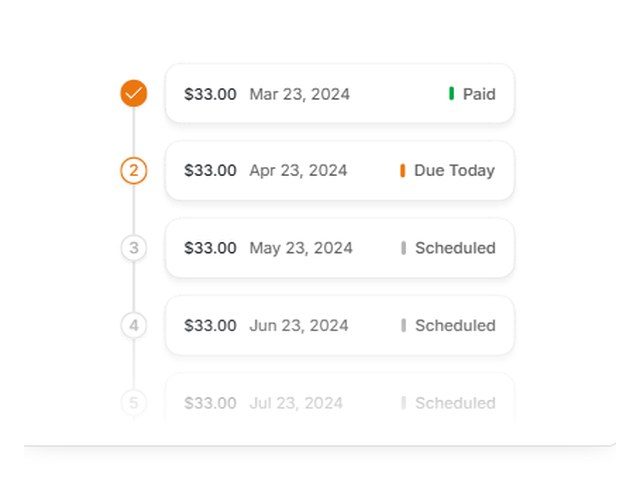
Every payment runs on schedule, with paid, due, and upcoming payments in one view.
Recurring billing that updates many expired or replaced cards on its own, plus a customer vault for cards on file.
Retainers, memberships, and payment plans on a schedule.
Scheduled and recurring payments, including installment plans, from the same app you use at the counter.
Recurring billing with an automatic card updater, on cards or ACH.
Auto pay, payment plans, and late fees, with invoices on your schedule.
Recurring billing for subscriptions, synced with QuickBooks and NetSuite.
Billing some other way? Tell us the schedule and we'll set it up.
Monthly dues charged on the same day each month.
A set fee each month for ongoing work.
Recurring charges for a monthly product shipment.
A large balance split into scheduled payments.
One yearly charge, renewed on schedule.
Cleaning, lawn care, and pool service billed each week.
Recurring billing fits any small business that charges the same customer more than once. These are the four we set up most.
Pool service, lawn care, cleaning, pest control, and HVAC maintenance plans. Charge the card on file after each visit or on the same day each month, instead of chasing checks.
Trades and home services →
Monthly boxes, clubs, and members who pay dues. Gyms and studios have their own needs, like sign-up fees, freezes, and class packs, so they get their own page.
Gym and membership billing →
Bookkeepers, agencies, consultants, IT support, and law firms. A set fee runs each month, and clients can pay by card or ACH.
Professional services →
Dental work, medical balances, big repair jobs, and tuition. Split a large balance into a set number of payments that stop on their own when it's paid off.
Medical and dental →
Every tool we set up follows the same basic flow. Here's what happens from the first payment to the hundredth.
The customer gives you a card or bank account once, in person, over the phone, or through a secure payment link. It's stored in the gateway's customer vault, not on your computer or in a spreadsheet.
Pick the amount, the start date, and how often it runs: weekly, monthly, yearly, or a custom interval. For an installment plan, set the number of payments and it stops on its own.
On each billing date the payment runs without anyone keying it in. You can pause, change, or cancel a schedule from the dashboard at any time.
The customer gets a receipt by email for each payment, so they know the charge is coming from you and what it was for.
On supported gateways, many expired or replaced cards update on their own before they ever fail. If a charge still declines, it shows in your dashboard, and you can retry it or text the customer a link to update their card.
Card payments get next-day funding, the same as the rest of your account. Every payment shows in your reports, and it can sync to QuickBooks Online.
Pairs well with: Memberships · Invoicing · Payment gateways · QuickBooks integrations
ACH pulls the payment straight from the customer's bank account. It's usually priced as a small flat fee per payment instead of a percentage, so it often costs less than a card when the amount is large.
That makes it a good fit for retainers, monthly service contracts, tuition, and large installment plans.
Bank payments take a little longer to clear than cards, so ACH works best for scheduled bills, not same-day sales. If an account doesn't have the funds, the payment comes back as returned and you'll see it in the dashboard.
Whether you set it up with us or someone else, check for these before you commit.
Related: Invoicing and payment links · QuickBooks integrations · Virtual terminals · Gym and studio billing
Payments run on schedule without anyone keying them in.
Weekly, monthly, yearly, or a custom interval.
Bill a saved card or a bank account.
Many expired or replaced cards update on their own, so fewer payments fail.
Cards stored securely for future billing.
Through Hyfin, SwipeSimple, BillerGenie, or Chargezoom.
You get next-day funding, so you aren't waiting days for your own money.
Terminals and POS at $0 upfront on approved setups. No lease. We match the equipment to how you sell.
No long-term contract and no cancellation fee on the processing agreement we set up.
Setup and training are part of the account.
Your markup never goes up. Interchange is set by the card networks and can change.
Processor and POS support is available 24/7, except most federal holidays. Day-to-day account questions come straight to us.
Yes. Save the customer's card or bank account once, set the amount and billing day, and the payment runs every month on its own. You can pause, change, or cancel it from the dashboard.
Yes. The PayBright Gateway, Fluidpay, NMI, and SwipeSimple can all bill a bank account on a schedule. ACH is often the lower-cost choice for large monthly amounts like retainers or payment plans.
Yes. Hyfin, SwipeSimple, BillerGenie, and Chargezoom sync payments with QuickBooks Online, and Chargezoom also works with NetSuite. See our QuickBooks integrations page.
The PayBright Gateway, Fluidpay, and NMI update many expired or replaced cards automatically, so fewer payments fail. If a payment still declines, you'll see it in the dashboard and can retry it or send the customer a link to update their card.
Yes. Hyfin, SwipeSimple, and BillerGenie handle installment plans. Set the number of payments and the schedule ends when the balance is paid.
Yes. Hyfin, BillerGenie, Chargezoom, and SwipeSimple do both. Some clients get a monthly invoice with a payment link, others are on auto pay. See invoicing.
Still have a question? Call 949-946-2442 or text us.
Set up recurring billing →New Business? Start Here
Other solutions: All solutions · Business funding · Gift cards & loyalty · High-risk processing · Invoicing · Merchant services · Mobile payments · Payment gateways · QuickBooks integrations · Virtual terminals
Attach your last 2 months of statements if you have them. If not, send your details and we'll follow up.
No statements needed. Tell us about the business and we'll recommend the POS and payment setup that fits, then follow up to go over it.