
Solutions · Invoicing
Send the invoice by text or email. Your customer pays by card or bank from a link. No more chasing past-due balances.
Get My Free Rate Analysis →New Business? Start Here
Or call 949-946-2442 or text us.
For service businesses, contractors, B2B, and nonprofits that bill customers instead of ringing them up. Invoices, reminders, and payments run on their own, and Hyfin syncs both ways with QuickBooks Online.
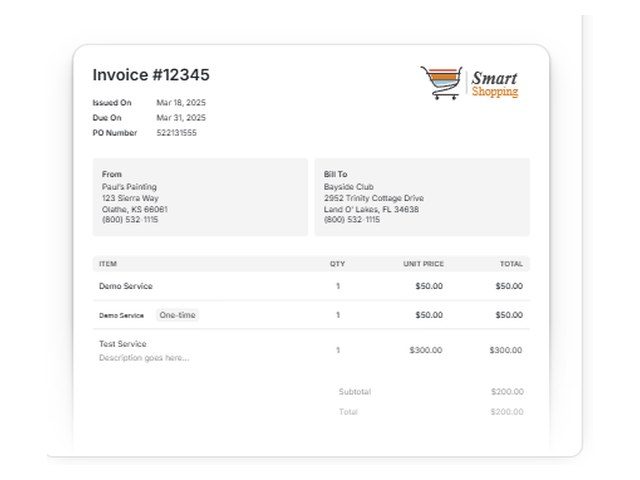
Send invoices by text or email, with installments, reminders, and late fees or early-pay discounts.
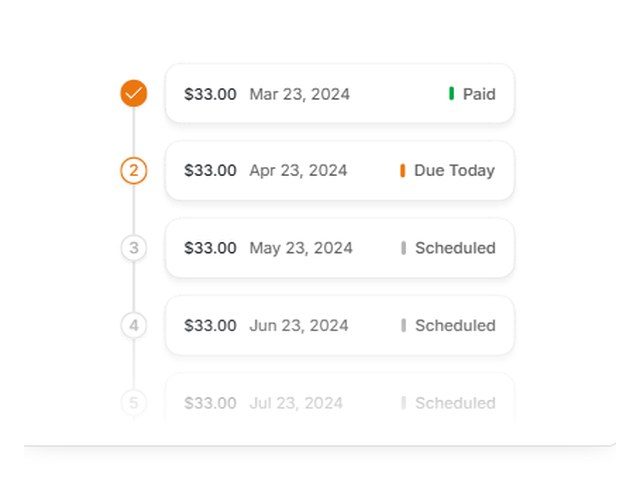
Retainers, gym and studio memberships, and payment plans. The customer approves once and payments run on schedule.
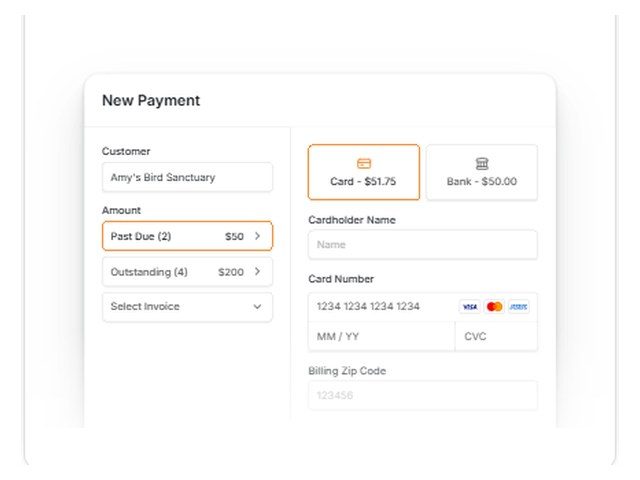
Take a card or bank payment over the phone, with past-due balances pulled in for you.
Also included: a client portal, deposits and installments, payment links and QR codes, saved payment methods, donation pages for nonprofits and churches, dual pricing or surcharging (surcharging isn't allowed in every state and can't be applied to debit cards), and an API for software and kiosks.
Automated invoicing and payments that connect to your accounting software.
Invoicing, payments, and reconciliation that sync with QuickBooks and NetSuite.
Bill customers by email or text from the SwipeSimple app, and they pay in seconds. See SwipeSimple →
Invoices by email or text, with tracking for what has been paid. See payment gateways →
Text-to-pay and electronic invoicing from one gateway account.
Itemized invoices sent by email or text.
Retainers and monthly services billed on a schedule.
Clients can pay by bank transfer instead of a card.
A payment link by text that clients can pay from their phone.
Reminders go out before and after the due date.
Clients view invoices and pay in one place.
Split a big invoice into payments.
See what's been opened, paid, or past due.
Deposits before the job and invoices when it is done.
Invoices, retainers, and payment plans for clients.
Invoices with lower rates on qualifying business card payments through the PayBright Gateway.
Donation pages and invoices on the same account.
One-time invoices, deposits, installments, or a mix.
Hyfin, BillerGenie, Chargezoom, or SwipeSimple, based on how you work.
Link QuickBooks or NetSuite so payments post on their own.
By text or email, with card and bank payment options.
Pairs well with: Recurring billing · QuickBooks integrations · Virtual terminals · Payment gateways
You get next-day funding, so you aren't waiting days for your own money.
Terminals and POS at $0 upfront on approved setups. No lease. We match the equipment to how you sell.
No long-term contract and no cancellation fee on the processing agreement we set up.
Setup and training are part of the account.
Your markup never goes up. Interchange is set by the card networks and can change.
Processor and POS support is available 24/7, except most federal holidays. Day-to-day account questions come straight to us.
Yes. Hyfin, BillerGenie, Chargezoom, and the PayBright Gateway all take ACH bank payments as well as cards.
Yes. Hyfin syncs both ways with QuickBooks Online, and SwipeSimple, BillerGenie, and Chargezoom connect to QuickBooks too. See QuickBooks integrations.
Yes. Hyfin sends reminders and can add late fees or early-pay discounts, and Chargezoom sends automated follow-ups.
Yes. Hyfin handles deposits and installments, and BillerGenie and SwipeSimple handle payment plans.
Yes. Hyfin and the PayBright Gateway can send invoices and payment links by text or email.
Yes. Hyfin, BillerGenie, and Chargezoom give clients a portal to view and pay their invoices.
Card payments get next-day funding, the same as the rest of your account.
Still have a question? Call 949-946-2442 or text us.
Get My Free Rate Analysis →New Business? Start Here
Other solutions: All solutions · Business funding · Gift cards & loyalty · High-risk processing · Merchant services · Mobile payments · Payment gateways · QuickBooks integrations · Recurring billing · Virtual terminals
Attach your last 2 months of statements if you have them. If not, send your details and we'll follow up.
No statements needed. Tell us about the business and we'll recommend the POS and payment setup that fits, then follow up to go over it.