
Solutions · Virtual terminals
Customer on the phone? Type in the card or bank details from your computer and you're done. No reader, no terminal, nothing to plug in.
Set up a virtual terminal →New Business? Start Here
Or call 949-946-2442 or text us.
A virtual terminal is a secure web page where you type in a customer's card or bank details to take a payment. It does the same job as the card machine on a counter, but the customer isn't standing in front of you.
You log in from a computer, tablet, or phone, enter the amount and the payment details, and the money lands in the same merchant account as the rest of your sales.
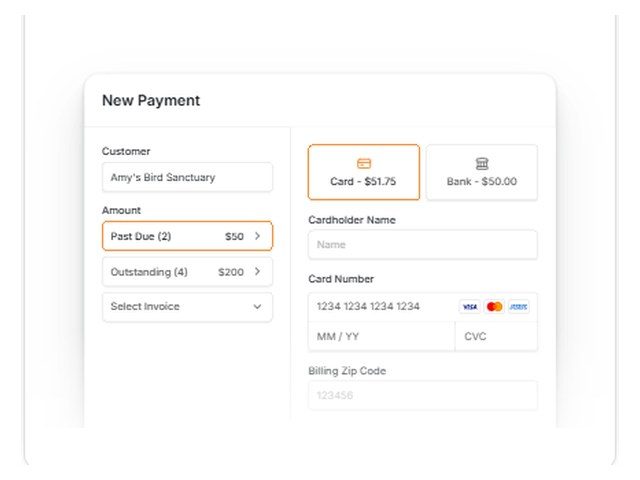
Type in the card or bank details while the customer is on the phone, and the payment lands in the same merchant account as everything else.
A virtual terminal to take cards by phone or browser, with a customer vault for cards on file.
Take a card or bank payment over the phone, with past-due balances pulled in for you.
A virtual terminal for payments over the phone or on your computer, in the same app as your reader.
A virtual terminal with card and ACH on one form.
A virtual terminal for phone orders, with built-in fraud detection.
A virtual terminal, hosted payment page, and QR code payment links.
The customer reads you their card while you're on the call, and the payment runs before you hang up.
Order forms and checks-by-mail customers who'd rather pay by card. Key it in the day it arrives.
Save a repeat customer's card once, then charge it for the next order or on a schedule.
Key in a card or ACH payment against an open invoice, or send the invoice with a link to pay online.
A virtual terminal makes phone payments easy. A few habits keep them safe for you and your customers.
Enter the card into the virtual terminal while the customer is on the line. Don't write card numbers on paper, sticky notes, or in an email.
Enter the billing ZIP code and the 3 or 4-digit code on the card. The gateway checks them against the card issuer, and a mismatch is a sign to stop and confirm.
For a new customer or a large order, text or email a payment link so the customer types in their own card. You never hear the number at all.
For repeat customers, store the card in the gateway's customer vault, not in a spreadsheet or your CRM. Next time, charge it without asking again.
Everyone who takes payments gets their own login, so you can see who ran each charge and turn off access when someone leaves.
Rush shipping to a different address, several cards tried in a row, or an order far bigger than usual are worth a second look. Authorize.net includes built-in fraud detection.
Everything below runs from the same browser screen. Which features you get depends on the tool we set up, and we'll tell you before you start.
Save cards in a secure customer vault and charge repeat customers without asking for the number again.
Turn a saved card into a weekly, monthly, or yearly schedule from the same screen. See recurring billing.
Text or email a link, and the customer pays from their phone. NMI also offers hosted payment pages and QR code links.
Take a payment from a checking account on the same form as cards, which works well for larger B2B payments.
Email the customer a receipt the moment the payment runs, so they have a record of the call.
Search payments by customer, date, or amount, issue refunds, and see what's settled. Hyfin syncs with QuickBooks Online.
Need online checkout on your website too? A payment gateway runs your web checkout and the virtual terminal from one login. Billing clients? See invoicing and payment links.
By phone, by mail, or against invoices.
The PayBright Gateway, Hyfin, SwipeSimple, Fluidpay, Authorize.net, or NMI, based on how you take payments.
No hardware to install.
Then next-day funding on your sales.
Pairs well with: Payment gateways · Invoicing · Recurring billing · Mobile payments
You get next-day funding, so you aren't waiting days for your own money.
Terminals and POS at $0 upfront on approved setups. No lease. We match the equipment to how you sell.
No long-term contract and no cancellation fee on the processing agreement we set up.
Setup and training are part of the account.
Your markup never goes up. Interchange is set by the card networks and can change.
Processor and POS support is available 24/7, except most federal holidays. Day-to-day account questions come straight to us.
A secure web page where you type in a customer's card or bank details to take a payment. It runs in a browser on a computer, tablet, or phone, so you don't need a card reader.
Yes. That's what most businesses use it for. Type the card in while the customer is on the line, add the billing ZIP and security code, and email them a receipt.
Usually, yes. Card networks charge higher interchange on card-not-present payments than on tapped or dipped cards. Your statement shows the difference, and a Free Rate Analysis shows it line by line.
Yes. The PayBright Gateway, Fluidpay, NMI, and other tools we set up have a customer vault. Save the card once, then charge it for the next order or set up recurring payments.
Yes. Fluidpay, Hyfin, and the PayBright Gateway take card and bank payments on the same screen.
The gateway is the system that sends card payments to the processor. The virtual terminal is the screen inside it where you key in payments by hand. Most gateways we set up include both, plus online checkout. See payment gateways.
Still have a question? Call 949-946-2442 or text us.
Set up a virtual terminal →New Business? Start Here
Other solutions: All solutions · Business funding · Gift cards & loyalty · High-risk processing · Invoicing · Merchant services · Mobile payments · Payment gateways · QuickBooks integrations · Recurring billing
Attach your last 2 months of statements if you have them. If not, send your details and we'll follow up.
No statements needed. Tell us about the business and we'll recommend the POS and payment setup that fits, then follow up to go over it.